
AlphaFold2
Easy to use protein structure and complex prediction using AlphaFold2 and Alphafold2-multimer.
Simulation
Input and output formats: not stated by the authors.
Get it on your computer
Install the app on your own computer: download the installer for your system, and the steps for that system open below the buttons. You do this once; installing needs an internet connection, because the installer downloads the app's Python packages.
v0.0.1 · 17 November 2026 · files come from github.com/CellMigrationLab/AlphaFold2/releases
Windows
Windows installer315.3 MB · .exeInstallers built with LabConstrictor are not code-signed yet, so Windows may warn you. Run files only from this app's GitHub release. See the Windows steps.
macOS
Apple Silicon (M1 or later)189.7 MB · .pkgIntel196.6 MB · .pkgNot sure which? Open the Apple menu, then About This Mac: Intel means Intel, M1 or later means Apple Silicon. If macOS refuses to open it, see the macOS steps.
Linux
Linux installer226.8 MB · .shNeeds a terminal. Run it with: bash <file name>. See the Linux steps.
These installers are for Windows, macOS and Linux computers. You can also open a notebook in your browser below.
How to install on Windows
- Download the
.exefile and double-click it. -
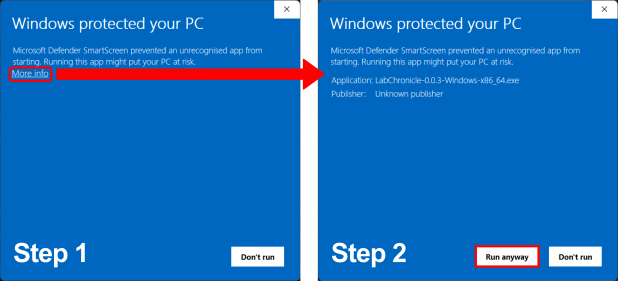
If Windows shows "Windows protected your PC", click "More info" and then "Run anyway". The installers are not code-signed yet.
-
Follow the on-screen prompts. A command prompt window opens during the installation: this is normal, do not close it.
- Launch the app from the Start Menu or your desktop.
How to install on macOS
- Choose your file: open the Apple menu, then About This Mac. If the Chip or Processor says Intel, download the Intel installer; if it says M1, M2 or similar, download the Apple Silicon one.
- Double-click the
.pkgfile. If macOS refuses to open it, go to System Settings, Privacy & Security, scroll down to the message about the package and click "Open Anyway". The button appears only after you have tried to open the file once. - Follow the prompts (we recommend "Install only for me"). Launch the app from your Applications folder.
How to install on Linux
- Download the
.shfile. - Open a terminal in the download folder and run
bashfollowed by the name of the file you downloaded, for example:bash MyApp-0.1.0-Linux-x86_64.sh - Follow the prompts, then launch the app from your applications menu.
All systems, with pictures: Install an app.
Notebooks to open in your browser
These run on Google's servers in Google Colab: you need an internet connection and a Google account, and any data you load into the notebook is handled by Google. The desktop app runs on your computer.
- AlphaFold2
 Open in ColabView on GitHub
Using it
The authors have not given first-run steps.
For any LabConstrictor desktop app: after installing, open the app from the Start menu (Windows), the Applications folder (macOS) or your applications menu (Linux). A terminal window opens with it: keep it open while you work. Its Welcome notebook lists the app's notebooks; the notebook usage guide shows how to work with it.
Read more: README on GitHub.
How to cite
The authors give this publication to cite: doi:10.1038/s41592-022-01488-1
Name the version you used (latest release: v0.0.1 · 17 November 2026).
All downloads
Every installer of version 0.0.1 (7 files, with checksums)
Released 17 November 2026. Files come straight from the app's GitHub release.
| System | Format | Size | File | SHA-256 (from GitHub) |
|---|---|---|---|---|
| Linux 64-bit (x86_64) | .sh | 226.8 MB | AlphaFold2-0.0.1-Linux-x86_64.sh | d0f785b74874cbeb367d21daff357e5d87860b53b0eeafbf90161d52f46d7c0f |
| macOS (Apple Silicon) | .pkg | 189.7 MB | AlphaFold2-0.0.1-MacOSX-arm64.pkg | c44fdfedfe0a24c7ee2875fef6b0d8fd2c95b6625f556078e9dc8241290f4362 |
| macOS (Apple Silicon) | .sh | 190.7 MB | AlphaFold2-0.0.1-MacOSX-arm64.sh | bd56f6f857cb1971a4a8ebcee1533093373a40da081e8b9116eacb9bf5a1ad7a |
| macOS (Intel) | .pkg | 196.6 MB | AlphaFold2-0.0.1-MacOSX-x86_64.pkg | d1c59bd53f8cc6705815719330e3be7d0f4a052d3abb6421da46b1e837f5fcb4 |
| macOS (Intel) | .sh | 197.5 MB | AlphaFold2-0.0.1-MacOSX-x86_64.sh | 211b163830410c504626ad8a571170476b74f54864cc25b3887537d71d1853a3 |
| Windows 64-bit (Intel/AMD, x86_64) | .exe | 315.3 MB | AlphaFold2-0.0.1-Windows-x86_64.exe | 1ee996577ff29bb3ffb79e2b49a5d671f4055607f5d6464dcd13d91ba80eecf9 |
| Windows 64-bit (Intel/AMD, x86_64) | .msi | 314.0 MB | AlphaFold2-0.0.1-Windows-x86_64.msi | c6a8c93c88dc798d56b236b8db4ec4e6e73c79235bce5e5507bb17622296df26 |
Details
- Kind
- Simulation
- Development status
- Not stated by the authors
- Latest release
- v0.0.1 · 17 November 2026
- License
- MIT
- Repository owner
- CellMigrationLab
- Links
- Report a problem