
Fast4DRegPy
Correct drift in 2D and 3D time-lapse microscopy and align channels: the Python version of Fiji's Fast4DReg.
Analysis napari plugin
 Fiji plugin
About
Fast4DRegPy measures and corrects drift in 2D and 3D time-lapse images, and aligns the channels of multichannel images. It follows the projection-based workflow of the Fiji tool Fast4DReg and uses NanoPyx for the cross-correlation.
On the published Fast4DReg test movie, its drift table differs from Fiji's by less than 0.005 pixels on every axis.
Input and output formats: not stated by the authors.
Get it on your computer
Install the app on your own computer: download the installer for your system, and the steps for that system open below the buttons. You do this once; installing needs an internet connection, because the installer downloads the app's Python packages.
v0.6.0 · 17 November 2026 · files come from github.com/CellMigrationLab/Fast4DRegPy/releases
Windows
Windows installer313.3 MB · .exeInstallers built with LabConstrictor are not code-signed yet, so Windows may warn you. Run files only from this app's GitHub release. See the Windows steps.
macOS
Apple Silicon (M1 or later)188.7 MB · .pkgIntel195.6 MB · .pkgNot sure which? Open the Apple menu, then About This Mac: Intel means Intel, M1 or later means Apple Silicon. If macOS refuses to open it, see the macOS steps.
Linux
Linux installer223.7 MB · .shNeeds a terminal. Run it with: bash <file name>. See the Linux steps.
These installers are for Windows, macOS and Linux computers.
How to install on Windows
- Download the
.exefile and double-click it. -
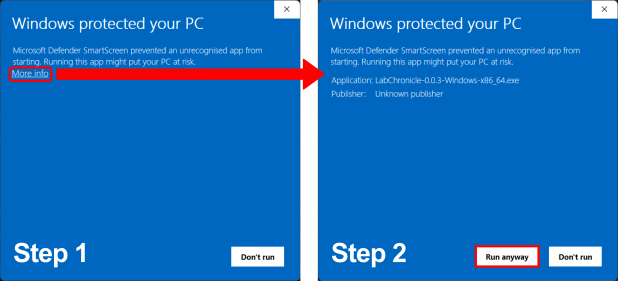
If Windows shows "Windows protected your PC", click "More info" and then "Run anyway". The installers are not code-signed yet.
-
Follow the on-screen prompts. A command prompt window opens during the installation: this is normal, do not close it.
- Launch the app from the Start Menu or your desktop.
How to install on macOS
- Choose your file: open the Apple menu, then About This Mac. If the Chip or Processor says Intel, download the Intel installer; if it says M1, M2 or similar, download the Apple Silicon one.
- Double-click the
.pkgfile. If macOS refuses to open it, go to System Settings, Privacy & Security, scroll down to the message about the package and click "Open Anyway". The button appears only after you have tried to open the file once. - Follow the prompts (we recommend "Install only for me"). Launch the app from your Applications folder.
How to install on Linux
- Download the
.shfile. - Open a terminal in the download folder and run
bashfollowed by the name of the file you downloaded, for example:bash MyApp-0.1.0-Linux-x86_64.sh - Follow the prompts, then launch the app from your applications menu.
All systems, with pictures: Install an app.
Python package (advanced)
pip install fast4dregpyThe PyPI package the authors name (pypi.org/project/fast4dregpy); its version can differ from the desktop app's.
Using it
The authors have not given first-run steps.
For any LabConstrictor desktop app: after installing, open the app from the Start menu (Windows), the Applications folder (macOS) or your applications menu (Linux). A terminal window opens with it: keep it open while you work. Its Welcome notebook lists the app's notebooks; the notebook usage guide shows how to work with it.
Read more: README on GitHub.
How to cite
The authors give this publication to cite: doi:10.1242/jcs.260728
Name the version you used (latest release: v0.6.0 · 17 November 2026).
All downloads
Every installer of version v0.6.0 (7 files, with checksums)
Released 17 November 2026. Files come straight from the app's GitHub release.
| System | Format | Size | File | SHA-256 (from GitHub) |
|---|---|---|---|---|
| Linux 64-bit (x86_64) | .sh | 223.7 MB | Fast4DRegPy-0.6.0-Linux-x86_64.sh | 1a4cac2e27cecc0f9c7c6852cd373b8feb95bbd987532be8afc5e700cd1c6c9e |
| macOS (Apple Silicon) | .pkg | 188.7 MB | Fast4DRegPy-0.6.0-MacOSX-arm64.pkg | 83c5f5280fdfb07448c90a40994530a6978bd1f4598b8eae707d3d612af7cf83 |
| macOS (Apple Silicon) | .sh | 189.5 MB | Fast4DRegPy-0.6.0-MacOSX-arm64.sh | 99e1f797dc6f0230a58967939cfec2a817c0a6c28fe5ea919204d5ffe45e2f62 |
| macOS (Intel) | .pkg | 195.6 MB | Fast4DRegPy-0.6.0-MacOSX-x86_64.pkg | 22b55499e88d4a220073133339bf82c634b785e85ea53b7128f104ef55b1dc77 |
| macOS (Intel) | .sh | 196.4 MB | Fast4DRegPy-0.6.0-MacOSX-x86_64.sh | 12bdbf68bfb9ec4f47fd7ea5368f59eac1f24e5aed7da485d7f4f742952fe32c |
| Windows 64-bit (Intel/AMD, x86_64) | .exe | 313.3 MB | Fast4DRegPy-0.6.0-Windows-x86_64.exe | 3a26d15b923c9b8d0cc7b4596cc2689a378160b27080df6082b035fefa6fc146 |
| Windows 64-bit (Intel/AMD, x86_64) | .msi | 312.5 MB | Fast4DRegPy-0.6.0-Windows-x86_64.msi | 02f595d72c5c7f66864b3d70de0461c99f36c6e63d6996d3059b6b8fe998781f |
Details
- Kind
- Analysis
- Development status
- Not stated by the authors
- Latest release
- v0.6.0 · 17 November 2026
- License
- MIT
- Repository owner
- CellMigrationLab
- Also in (plugins)
- napari plugin: Fiji plugin:
- Links
- Report a problem