
LabConstrictor Demo
A one-notebook example app that shows what a LabConstrictor repository produces.
TrainingTesting
About
A small image-preview notebook packaged as an installable app. Look at its repository to see how a LabConstrictor app is laid out.
Get it on your computer
Install the app on your own computer: download the installer for your system, and the steps for that system open below the buttons. You do this once; installing needs an internet connection, because the installer downloads the app's Python packages.
v0.0.4 · 4 November 2026 · files come from github.com/CellMigrationLab/LabConstrictor_Demo/releases
Windows
Windows installer315.8 MB · .exeInstallers built with LabConstrictor are not code-signed yet, so Windows may warn you. Run files only from this app's GitHub release. See the Windows steps.
macOS
Apple Silicon (M1 or later)188.8 MB · .pkgIntel196.1 MB · .pkgNot sure which? Open the Apple menu, then About This Mac: Intel means Intel, M1 or later means Apple Silicon. If macOS refuses to open it, see the macOS steps.
Linux
Linux installer224.4 MB · .shNeeds a terminal. Run it with: bash <file name>. See the Linux steps.
These installers are for Windows, macOS and Linux computers.
How to install on Windows
- Download the
.exefile and double-click it. -
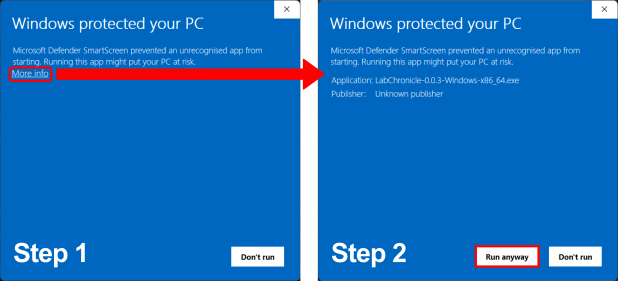
If Windows shows "Windows protected your PC", click "More info" and then "Run anyway". The installers are not code-signed yet.
-
Follow the on-screen prompts. Launch the app from the Start Menu or your desktop.
How to install on macOS
- Choose your file: open the Apple menu, then About This Mac. If the Chip or Processor says Intel, download the Intel installer; if it says M1, M2 or similar, download the Apple Silicon one.
- Double-click the
.pkgfile. If macOS refuses to open it, go to System Settings, Privacy & Security, scroll down to the message about the package and click "Open Anyway" (it appears only after you tried to open the file once). If you do not see it, try opening the file again, then check this page again. - Follow the prompts (we recommend "Install only for me"). Launch the app from your Applications folder.
How to install on Linux
- Download the
.shfile. - Open a terminal in the download folder and run
bashfollowed by the name of the file you downloaded, for example:bash MyApp-0.1.0-Linux-x86_64.sh - Follow the prompts, then launch the app from your applications menu.
All systems, with pictures: Install an app.
Using it
The authors have not given first-run steps.
For any LabConstrictor desktop app: after installing, open the app from the Start menu (Windows), the Applications folder (macOS) or your applications menu (Linux). A terminal window opens with it: keep it open while you work. Its Welcome notebook lists the app's notebooks; the notebook usage guide shows how to work with it.
Read more: README on GitHub.
All downloads
Every installer of version 0.0.4 (7 files, with checksums)
Released 4 November 2026. Files come straight from the app's GitHub release.
| System | Format | Size | File | SHA-256 (from GitHub) |
|---|---|---|---|---|
| Linux 64-bit (x86_64) | .sh | 224.4 MB | LabConstrictor_Demo-0.0.4-Linux-x86_64.sh | 7a791c265573cb941d2375a2a371511fef989495fe77af4f47299d408f112681 |
| macOS (Apple Silicon) | .pkg | 188.8 MB | LabConstrictor_Demo-0.0.4-MacOSX-arm64.pkg | 8fcaec8823ff061780a39afcd14ed0badc334797af7efb8710cd246a2085ba0b |
| macOS (Apple Silicon) | .sh | 189.4 MB | LabConstrictor_Demo-0.0.4-MacOSX-arm64.sh | 7bb7108e07222c3185edb574666a715e059883db76101ed3a2896f924c8e80dd |
| macOS (Intel) | .pkg | 196.1 MB | LabConstrictor_Demo-0.0.4-MacOSX-x86_64.pkg | 6b1fa272469697c52ade74f5ca98901bf444e6e0a1bbe0a8d93eda0e823e2757 |
| macOS (Intel) | .sh | 196.7 MB | LabConstrictor_Demo-0.0.4-MacOSX-x86_64.sh | 55805aedb5c9ff144a7f1158f1c42f2f3533b7572a81bb351787fb26ccab8651 |
| Windows 64-bit (Intel/AMD, x86_64) | .exe | 315.8 MB | LabConstrictor_Demo-0.0.4-Windows-x86_64.exe | 801f6a210336bd3ef900bee446820623deb3cbf2c834c3eb1f4378b7573ee1b4 |
| Windows 64-bit (Intel/AMD, x86_64) | .msi | 315.0 MB | LabConstrictor_Demo-0.0.4-Windows-x86_64.msi | c0ef16444b22114d095f22b3d2f03ebc84a8da252779ce034d1d68f46fa84635 |
Details
- Kind
- Training
- Development status
- Not stated by the authors
- Latest release
- v0.0.4 · 4 November 2026
- License
- MIT
- Repository owner
- CellMigrationLab
- Topics
- example
- Links
- Report a problem