
NucleiSky
Align microscopy images in 2D and 3D by matching the geometry of nuclei, like stars in a constellation.
Analysis napari plugin: experimental
 Fiji plugin: experimental
 QuPath plugin: experimental
About
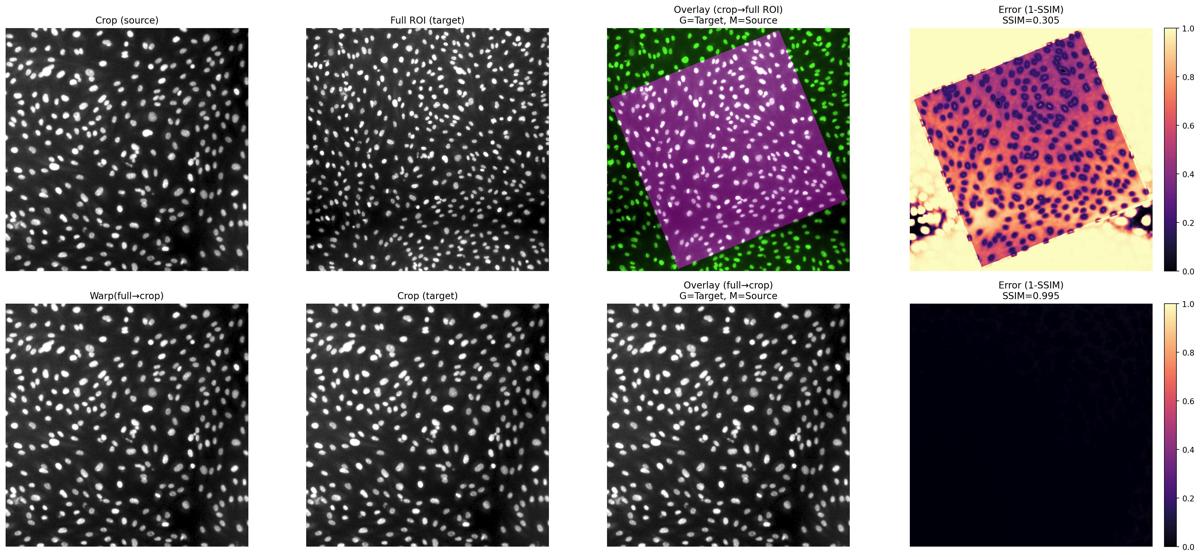
Instead of relying on pixel intensity, NucleiSky matches the geometry of the cells. It finds the calibrated similarity transform that best overlaps two landmark constellations, so a high-magnification region can be located in a whole slide or a thick tissue volume.
Works with
The authors say it works with:
- 2D app: two 2D images, a reference image and a partial view (ROI) to place into it
- 2D pixel size (µm/px) or 3D voxel size (z, y, x in µm): check acquisition metadata and supply missing calibration
- Image files: TIFF / OME-TIFF, NPY, Zarr / OME-Zarr, or standard image formats such as PNG / JPEG
- Nuclei label masks: built-in segmentation (threshold, Cellpose, InstanSeg) or your own masks
Produces
The authors say it produces:
- The saved transform (JSON / JSONL): scale, rotation and translation, with the match quality
- The aligned image, exported as TIFF (aligned_on_full_px.tif) or OME-Zarr (aligned_on_full_px.zarr)
- A quality-control overlay figure with an error map (1-SSIM)
- Optional nuclei segmentation masks (TIFF)
Get it on your computer
Install the app on your own computer: download the installer for your system, and the steps for that system open below the buttons. You do this once; installing needs an internet connection, because the installer downloads the app's Python packages.
v0.1.5 · 10 November 2026 · files come from github.com/CellMigrationLab/NucleiSky/releases
Windows
Windows installer329.6 MB · .exeInstallers built with LabConstrictor are not code-signed yet, so Windows may warn you. Run files only from this app's GitHub release. See the Windows steps.
macOS
Apple Silicon (M1 or later)201.4 MB · .pkgIntel207.8 MB · .pkgNot sure which? Open the Apple menu, then About This Mac: Intel means Intel, M1 or later means Apple Silicon. If macOS refuses to open it, see the macOS steps.
Linux
Linux installer236.0 MB · .shNeeds a terminal. Run it with: bash <file name>. See the Linux steps.
These installers are for Windows, macOS and Linux computers. You can also open a notebook in your browser below.
How to install on Windows
- Download the
.exefile and double-click it. -
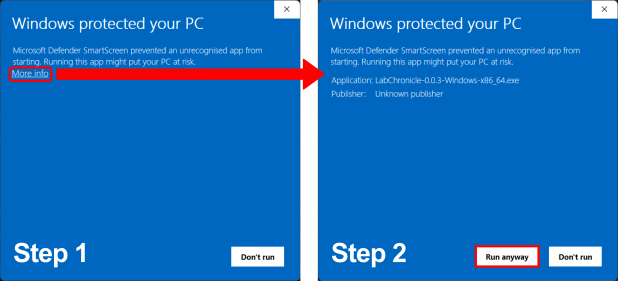
If Windows shows "Windows protected your PC", click "More info" and then "Run anyway". The installers are not code-signed yet.
-
Follow the on-screen prompts. Launch the app from the Start Menu or your desktop.
How to install on macOS
- Choose your file: open the Apple menu, then About This Mac. If the Chip or Processor says Intel, download the Intel installer; if it says M1, M2 or similar, download the Apple Silicon one.
- Double-click the
.pkgfile. If macOS refuses to open it, go to System Settings, Privacy & Security, scroll down to the message about the package and click "Open Anyway" (it appears only after you tried to open the file once). If you do not see it, try opening the file again, then check this page again. - Follow the prompts (we recommend "Install only for me"). Launch the app from your Applications folder.
How to install on Linux
- Download the
.shfile. - Open a terminal in the download folder and run
bashfollowed by the name of the file you downloaded, for example:bash MyApp-0.1.0-Linux-x86_64.sh - Follow the prompts, then launch the app from your applications menu.
All systems, with pictures: Install an app.
Python package (advanced)
pip install nucleiskyThe PyPI package the authors name (pypi.org/project/nucleisky); its version can differ from the desktop app's.
Notebooks to open in your browser
These run on Google's servers in Google Colab: you need an internet connection and a Google account, and any data you load into the notebook is handled by Google. The desktop app runs on your computer.
- 2D app
 Open in ColabView on GitHub
- 3D appOpen in ColabView on GitHub
- 2D Python API example (requires your data)Open in ColabView on GitHub
- 3D Python API example (synthetic demo or your data)Open in ColabView on GitHub
- 2D benchmarking (requires reference image)Open in ColabView on GitHub
- 3D benchmarking (requires reference volume)Open in ColabView on GitHub
Using it
- 2D app notebook, Step 0: run the first cell to initialize the environment (Google Colab installs the libraries automatically)
- Step 1: choose the reference image and a partial view; enter the pixel size if the metadata has none
- Step 2: segment nuclei (or load masks) and extract centroids; for 3D, check ZYX axis order and voxel spacing
- Step 3: run adaptive matching or a single matcher, and inspect the overlay before trusting an alignment
- Step 4: save and reuse the transform to align other channels or images from the same dataset
For any LabConstrictor desktop app: after installing, open the app from the Start menu (Windows), the Applications folder (macOS) or your applications menu (Linux). A terminal window opens with it: keep it open while you work. Its Welcome notebook lists the app's notebooks; the notebook usage guide shows how to work with it.
Read more: Documentation.
Limitations
The authors say:
- Only a similarity transform (one uniform scale, one rotation, one translation); no shear, non-uniform scaling or local elastic warping
- 2D matching needs one grayscale plane (RGB is converted); select a channel or project Z-stacks/time series first
- Needs enough nuclei: in practice at least about 10 points to overcome spatial ambiguity
- The crop and the full image must truly overlap; without overlap the matching fails
- Repetitive patterns (for example muscle fibers) can give a high inlier score but a wrong location
- 3D: requires ZYX axes and correct voxel spacing; cannot correct anisotropic tissue shrinkage; at least 4 nuclei needed
How to cite
The authors give this publication to cite: doi:10.1242/jcs.265152
Name the version you used (latest release: v0.1.5 · 10 November 2026).
All downloads
Every installer of version 0.1.5 (7 files, with checksums)
Released 10 November 2026. Files come straight from the app's GitHub release.
| System | Format | Size | File | SHA-256 (from GitHub) |
|---|---|---|---|---|
| Linux 64-bit (x86_64) | .sh | 236.0 MB | NucleiSky-0.1.5-Linux-x86_64.sh | 9e4dba69da2bb67db1536382e4a207b008b362421bcdcdb84cbbd886a4a30c80 |
| macOS (Apple Silicon) | .pkg | 201.4 MB | NucleiSky-0.1.5-MacOSX-arm64.pkg | 129dc867b69c2fc8e48181502bbf58e4fc4d5102e573c65afec2415310e6cf88 |
| macOS (Apple Silicon) | .sh | 199.7 MB | NucleiSky-0.1.5-MacOSX-arm64.sh | 429221c9cc59a51819b5b3dc36aea93cf775728e1e346baddffe647b060f3959 |
| macOS (Intel) | .pkg | 207.8 MB | NucleiSky-0.1.5-MacOSX-x86_64.pkg | 823219811b3878ea88f3bba2e8b324ae6e77475a989d74d19ec4764da0228b68 |
| macOS (Intel) | .sh | 206.1 MB | NucleiSky-0.1.5-MacOSX-x86_64.sh | b1c558c7eab27d32ecbdc347e960e952068538faeb52386d2643f47511352ec1 |
| Windows 64-bit (Intel/AMD, x86_64) | .exe | 329.6 MB | NucleiSky-0.1.5-Windows-x86_64.exe | 5dc02c36cd637810b2239a04c19d918f9aae29131106ff336c2931c32fdd8e28 |
| Windows 64-bit (Intel/AMD, x86_64) | .msi | 326.0 MB | NucleiSky-0.1.5-Windows-x86_64.msi | 1be191d8fd86586962c69e66baa64449571127d39cd01ab7f3740eb97f0c0f8e |
Details
- Kind
- Analysis
- Development status
- Not stated by the authors
- Latest release
- v0.1.5 · 10 November 2026
- License
- MIT
- Repository owner
- CellMigrationLab
- Also in (plugins)
- napari plugin: experimental Fiji plugin: experimental QuPath plugin: experimental
- Topics
- registration, ROI matching
- Links
- Report a problem · Documentation