
StarDist2D
Segment star-convex nuclei and cells in 2D images with StarDist, from a notebook, Fiji, napari or QuPath.
SegmentationExperimental napari plugin: experimental
 Fiji plugin: experimental
 QuPath plugin: experimental
About
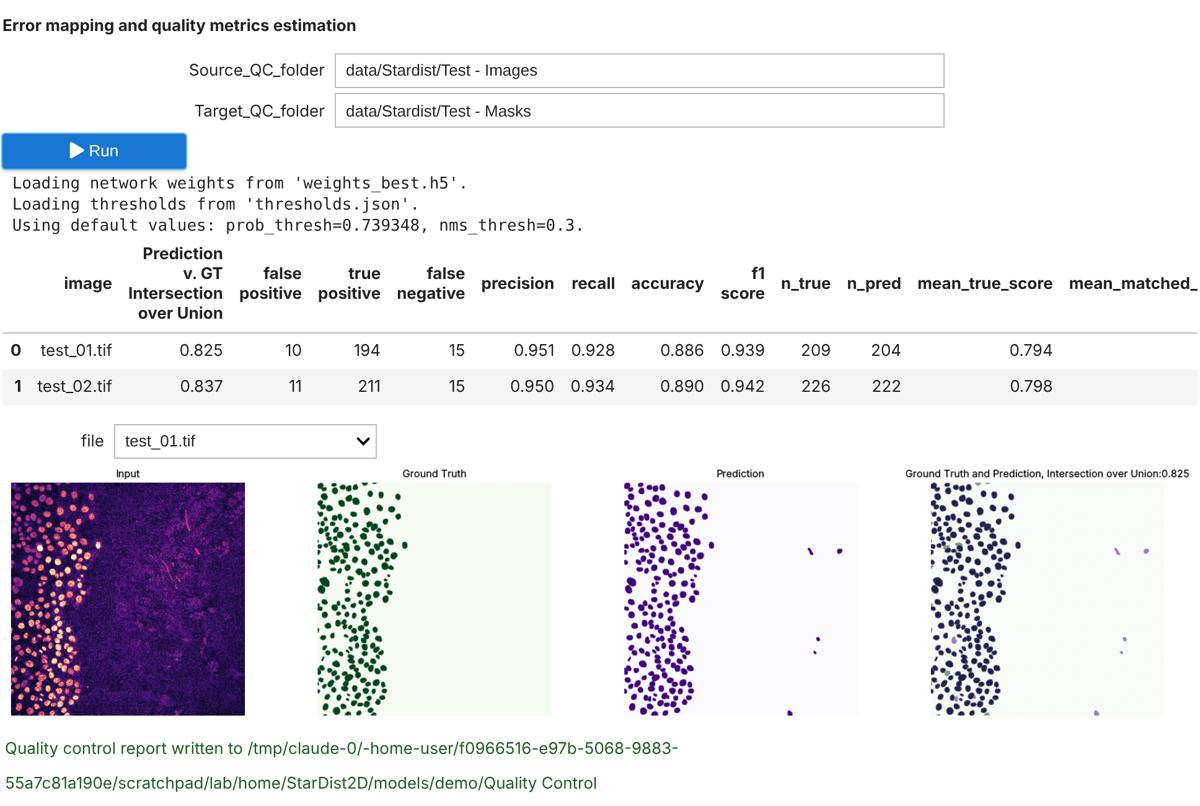
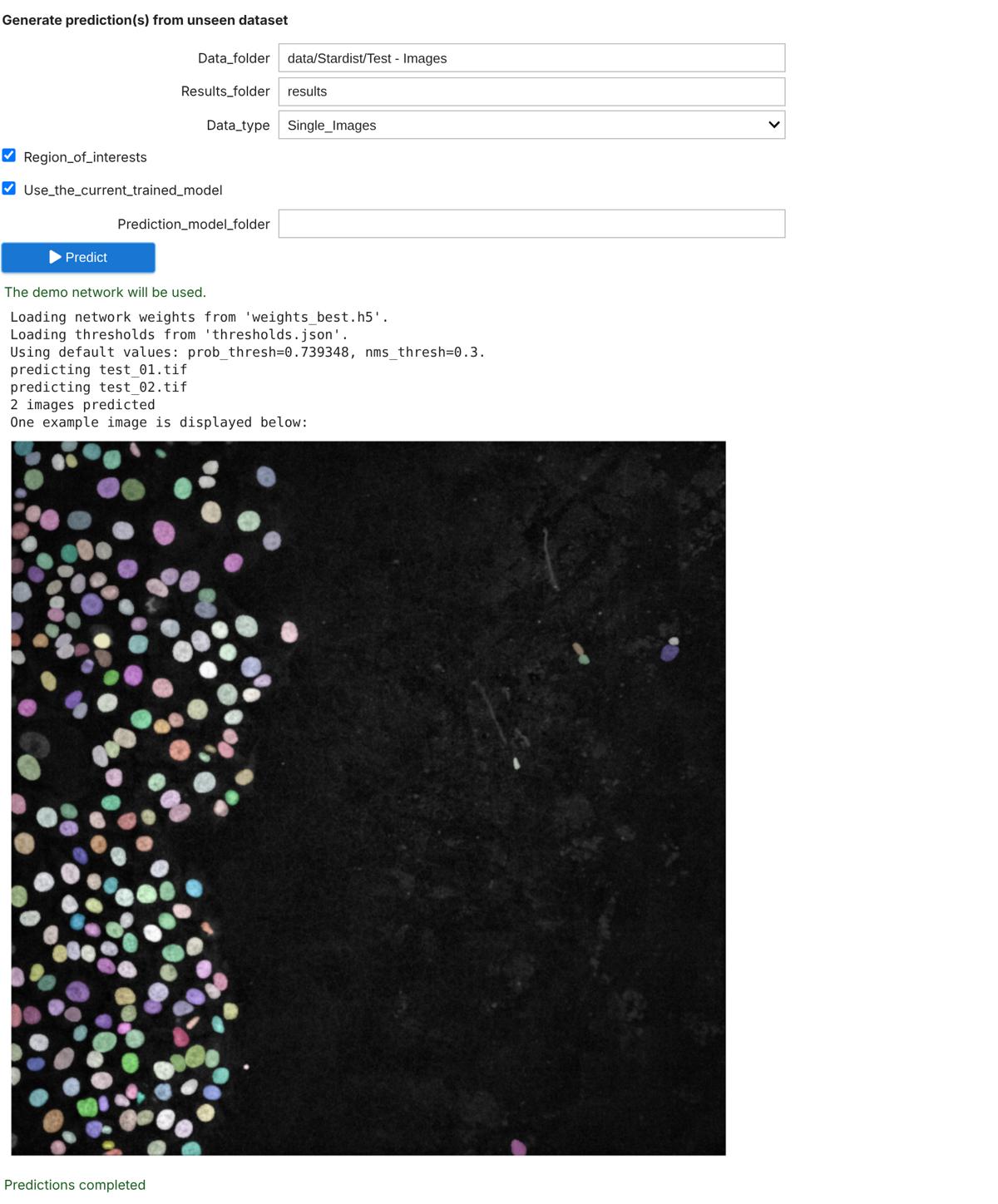
A LabConstrictor port of the ZeroCostDL4Mic StarDist 2D notebook. Train a StarDist 2D model on your own images and masks, check its quality against ground truth, export it to the BioImage Model Zoo, and predict on new images, locally or on Google Colab.
The same installed environment also gives Fiji, napari and QuPath a StarDist 2D segmentation tool: choose an open image and a pretrained or your own trained model, and get a label image, outlines (ROI Manager, Shapes layer or QuPath annotations) and a table of per-object measurements.
Please cite StarDist when you use this app: Schmidt U., Weigert M., Broaddus C., Myers G. Cell Detection with Star-Convex Polygons. MICCAI 2018, Lecture Notes in Computer Science 11071, pp. 265-273 (doi:10.1007/978-3-030-00934-2_30). Please also cite ZeroCostDL4Mic, the notebook this app is built on: von Chamier L., Laine R. F. et al. Democratising deep learning for microscopy with ZeroCostDL4Mic. Nature Communications 12, 2276 (2021) (doi:10.1038/s41467-021-22518-0), and LabConstrictor, which packages it (doi:10.48550/arXiv.2603.10704).
Works with
The authors say it works with:
- 2D images as TIFF: single-channel fluorescence or RGB (H&E); stacks are predicted frame by frame in the notebook
- Training: matching folders of images and label masks (same file names, TIFF)
- A pretrained model (2D_versatile_fluo, 2D_versatile_he, 2D_paper_dsb2018) or your own StarDist 2D model folder
Produces
The authors say it produces:
- Label images (one integer per object), TIFF
- Object outlines: ImageJ ROI zip, GeoJSON (Fiji ROI Manager, napari Shapes, QuPath annotations)
- Per-object table (centroid, area, probability) and object counts, CSV
- Trained model folder, quality-control metrics (IoU, F1, panoptic quality) and PDF reports
Get it on your computer
Install the app on your own computer: download the installer for your system, and the steps for that system open below the buttons. You do this once; installing needs an internet connection, because the installer downloads the app's Python packages.
v1.2.0 · 14 November 2026 · files come from github.com/CellMigrationLab/Stardist2D/releases
Windows
Windows installer322.7 MB · .exeInstallers built with LabConstrictor are not code-signed yet, so Windows may warn you. Run files only from this app's GitHub release. See the Windows steps.
macOS
Apple Silicon (M1 or later)198.4 MB · .pkgIntel Macs: not supported by this app's authors.
Not sure which? Open the Apple menu, then About This Mac: Intel means Intel, M1 or later means Apple Silicon. If macOS refuses to open it, see the macOS steps.
Linux
Linux installer232.9 MB · .shNeeds a terminal. Run it with: bash <file name>. See the Linux steps.
These installers are for Windows, macOS and Linux computers. You can also open a notebook in your browser below.
How to install on Windows
- Download the
.exefile and double-click it. -
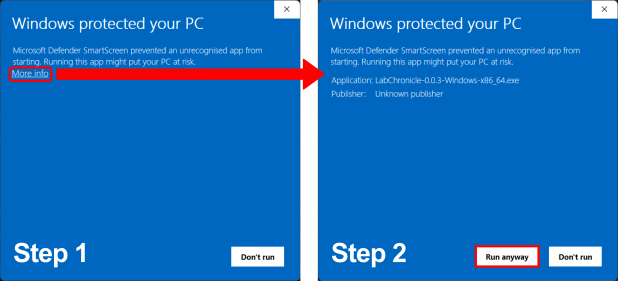
If Windows shows "Windows protected your PC", click "More info" and then "Run anyway". The installers are not code-signed yet.
-
Follow the on-screen prompts. Launch the app from the Start Menu or your desktop.
How to install on macOS
- Choose your file: open the Apple menu, then About This Mac. If the Chip or Processor says Intel, download the Intel installer; if it says M1, M2 or similar, download the Apple Silicon one.
- Double-click the
.pkgfile. If macOS refuses to open it, go to System Settings, Privacy & Security, scroll down to the message about the package and click "Open Anyway" (it appears only after you tried to open the file once). If you do not see it, try opening the file again, then check this page again. - Follow the prompts (we recommend "Install only for me"). Launch the app from your Applications folder.
How to install on Linux
- Download the
.shfile. - Open a terminal in the download folder and run
bashfollowed by the name of the file you downloaded, for example:bash MyApp-0.1.0-Linux-x86_64.sh - Follow the prompts, then launch the app from your applications menu.
All systems, with pictures: Install an app.
Notebooks to open in your browser
These run on Google's servers in Google Colab: you need an internet connection and a Google account, and any data you load into the notebook is handled by Google. The desktop app runs on your computer.
- StarDist 2D notebook
 Open in ColabView on GitHub
Using it
- Fiji, napari or QuPath: open an image, start LabConstrictor Tools and choose StarDist 2D: Segment nuclei
- Pick 2D_versatile_fluo for fluorescence or 2D_versatile_he for H&E, keep the default thresholds, and run
- Notebook: open the StarDist 2D notebook from the app (or Colab) and follow sections 1 to 6; section 3.1 gives example data offline
- To train your own model: put images and masks in two folders with matching names, then run sections 3 and 4
For any LabConstrictor desktop app: after installing, open the app from the Start menu (Windows), the Applications folder (macOS) or your applications menu (Linux). A terminal window opens with it: keep it open while you work. Its Welcome notebook lists the app's notebooks; the notebook usage guide shows how to work with it.
Read more: Documentation.
Limitations
The authors say:
- 2D only; use the StarDist 3D app for volumes
- Objects must be roughly star-convex (round nuclei, cells); long or branched shapes segment poorly
- GPU training only on Linux with an NVIDIA GPU; Windows and macOS train on the CPU (slow), prediction works everywhere
- Pretrained models are downloaded on first use (internet needed once)
- QuPath receives outlines as annotations, not detections
How to cite
The authors give this publication to cite: doi:10.1007/978-3-030-00934-2_30
Name the version you used (latest release: v1.2.0 · 14 November 2026).
All downloads
Every installer of version 1.2.0 (5 files, with checksums)
Released 14 November 2026. Files come straight from the app's GitHub release.
| System | Format | Size | File | SHA-256 (from GitHub) |
|---|---|---|---|---|
| Linux 64-bit (x86_64) | .sh | 232.9 MB | StarDist2D-1.2.0-Linux-x86_64.sh | 616ddedc14fb923272a57f238c7eff4da29f2c1440763f37279a5e401f0d8f08 |
| macOS (Apple Silicon) | .pkg | 198.4 MB | StarDist2D-1.2.0-MacOSX-arm64.pkg | dfd7b3d491dc07e8383875d20e53e2458f6af08431f2511f66f045f336f73e26 |
| macOS (Apple Silicon) | .sh | 198.7 MB | StarDist2D-1.2.0-MacOSX-arm64.sh | 6de43965eefc4a4aac44e25ee046a68a1ceba1d97558b2fb66fc8d131f843ec7 |
| Windows 64-bit (Intel/AMD, x86_64) | .exe | 322.7 MB | StarDist2D-1.2.0-Windows-x86_64.exe | c36c7d83c6795c4f47d4c641681aaa08ebbe12ed650dfc6ff3c9cd2246b68365 |
| Windows 64-bit (Intel/AMD, x86_64) | .msi | 321.8 MB | StarDist2D-1.2.0-Windows-x86_64.msi | 8afe7e379eef9630064c5eee959950f27bacb3d42258e4a8d65cb75eeaca732e |
Details
- Kind
- Segmentation
- Development status
- Experimental
- Latest release
- v1.2.0 · 14 November 2026
- License
- MIT
- Repository owner
- CellMigrationLab
- Also in (plugins)
- napari plugin: experimental Fiji plugin: experimental QuPath plugin: experimental
- Topics
- segmentation, nuclei, StarDist, deep learning, ZeroCostDL4Mic
- Links
- Report a problem · Documentation